

Note: Vector Studio 2's Adobe Illustrator CS version is here!!



Vector
Studio 2's suite of Adobe Illustrator plug-ins brings
designers stunning creative filters and "can't do without" workflow
tools. Vector Studio 2's eight plug-ins include powerful shape editing
tools, elegant texturing facilities, intuitive and interactive
color editing, and workspace management.
Vector
Studio 2 is tightly integrated into the Illustrator working environment,
as can be seen in the Quickstart
Guide.
Vector
Studio 2 is fully compatible with Adobe Illustrator 9, 10, and
CS (Mac
OS9/Mac OSX/Windows).
Listed
below are the Eight incredible plug-ins contained in Vector Studio 2:
Palette
Sheperd
Tired of trying to organize all those palettes? Let Palette Shepherd save
multiple snapshots of your Adobe Illustrator working environment that
you can recall instantly!

Direction
Handler
Edit multiple path direction points simultaneously. Use symmetry snapping
to edit one half of your design while the other half is adjusted automatically.
Zoom Lens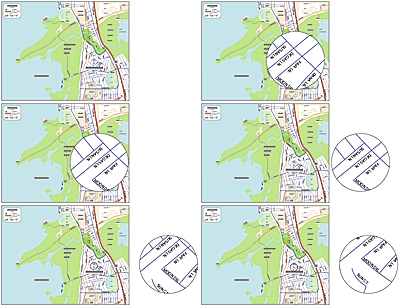
Apply live magnification effects to artwork visible behind a lens, or
create special effects lenses using Illustrator's live effects feature.
Retouch Brush Tools
Retouch
Brushes bring a new and powerful interaction to color editing in Illustrator.
Create fabulous airbrush effects and realistic images with vector-based
art using an image as a reference. Then refine it with brighten, darken,
and saturate brushes for stunning result.
Sampler
Tools


Adjust the colors of your design with two new powerful colorization techniques,
Gradient Sampling and Image Sampling.

Wrinkle
Remover
Paint out extra control points while preserving the overall look of curves.
It's great for cleaning up raster-to-vector conversions.
Gradient Factory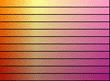
Creates collections of gradients by automatically creating and color shifting
gradient stops. These collections are displayed in the Gradient Factory
palette and can be applied with a single mouse click.
Gradient Texture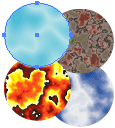
Gives Illustrators the subtle shading characteristics of image-based texturing
techniques, while maintaining the resolution independent qualities of
a vector drawing environment. Use gradients to create beautiful, organic
textures that look the same for print and the web!
Envelope
Mesh
The most powerful enveloping tool available in any  drawing
environment,
Envelope Mesh allows you to bend and manipulate artwork live and
right on Illustrator's artboard.
For Adobe Illustrator 8 or 9.
drawing
environment,
Envelope Mesh allows you to bend and manipulate artwork live and
right on Illustrator's artboard.
For Adobe Illustrator 8 or 9.